Building MenuMate: A Digital Menu for Restaurants
I share why I built MenuMate for restaurants and how it helps owners update menus, reduce printing costs, and serve guests more easily.
In 2024 I decided to stop waiting for the “perfect” idea and build something useful. I kept hearing the same problems from restaurant owners around me: updating menus took too much time, printing new menus was expensive, and it was hard to know what guests were really choosing. That led me to build MenuMate—a digital menu platform made for restaurants that want easier menu updates and a smoother guest experience.
Today, MenuMate is the main project I share when people ask what I can build. It shows how I listen to real business problems and turn them into a product that is simple to use.
Listening First, Then Building
Before building MenuMate, I spoke with owners, managers, and servers to understand their daily work. Paper menus could not keep up with reality: prices changed often, dishes sold out during service, and guests expected faster, easier ordering. Those conversations shaped the main goals for MenuMate:
- Give owners complete control over their menu in minutes, not weeks
- Remove the recurring printing costs that eat into already thin margins
- Make the menu easier for guests to browse and understand
- Help restaurants see which items are popular and when guests order most
Designing a Product Restaurants Enjoy Using
Building MenuMate meant designing for two audiences at once.
For Restaurant Owners
I focused on features that make day-to-day operations calmer:
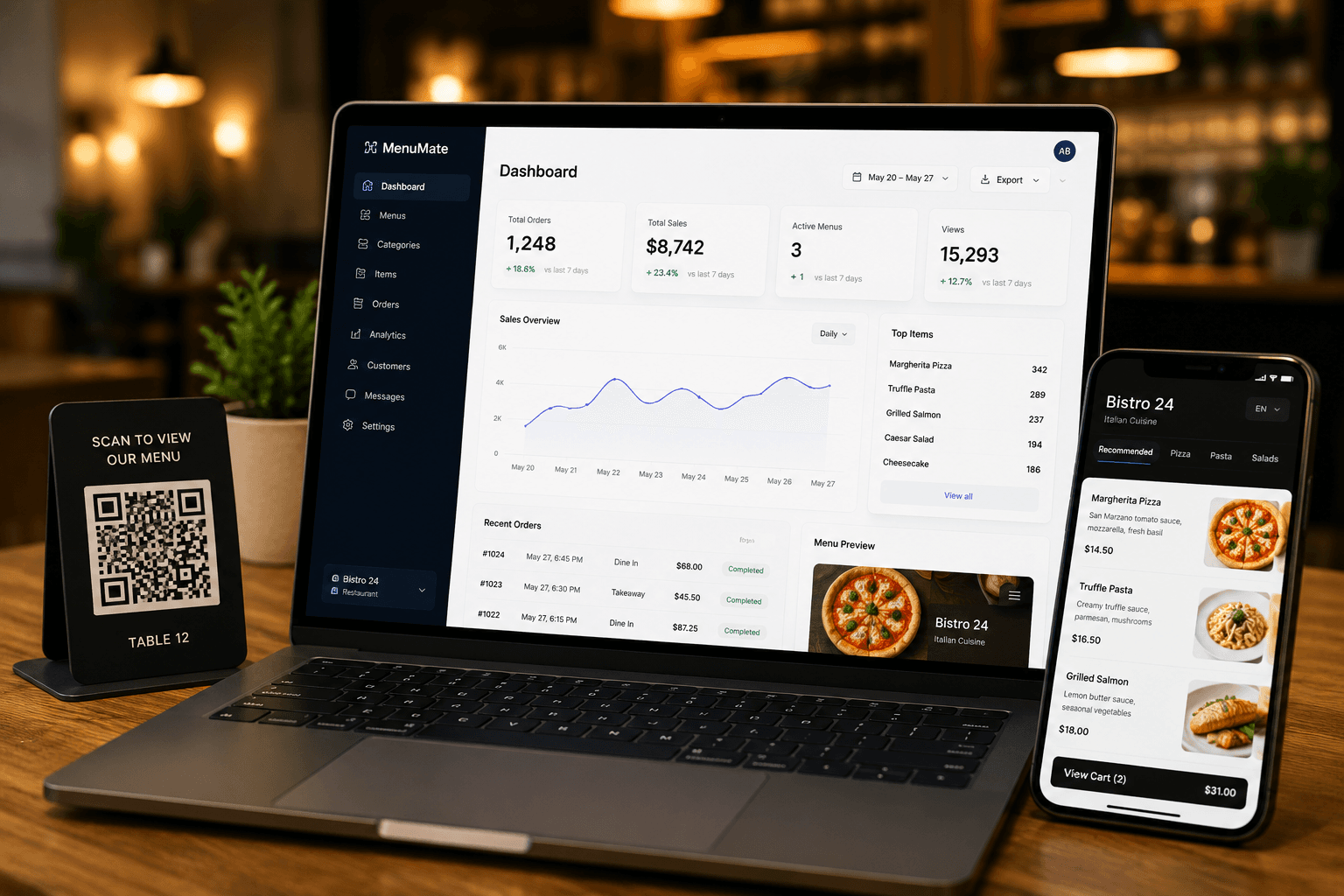
- Instant menu updates so owners can change prices, photos, and availability right away
- Mobile-friendly menus that look good on guests’ phones
- Simple dashboard for checking orders, popular items, and sales activity
- Multiple languages and currencies for restaurants serving different types of guests
- Printable menu option for restaurants that still need a paper version
- QR codes for tables, counters, takeout bags, or marketing materials
- Guest updates so restaurants can stay in touch with loyal customers
For Diners
I wanted the guest experience to feel effortless:
- No app required: scan a QR code and the menu opens instantly
- Helpful filters for dietary needs, allergens, and chef recommendations
- Secure checkout with familiar payment options
- Table-specific ordering that routes straight to the kitchen without mix-ups
Building MenuMate as a Solo Developer
Building MenuMate meant handling every part of the product myself. I planned the screens, designed the menus, built the dashboard, connected restaurant accounts, and tested the ordering flow from a guest’s phone to the restaurant side.
I wanted the product to feel practical, not complicated. Restaurant teams should be able to log in, update a menu item, publish the change, and get back to service without needing technical help. Guests should be able to scan, browse, and order without thinking about the software behind it.
That was the biggest lesson from building it: good restaurant software should remove work from the team, not add more steps.
Product Highlights I’m Proud Of
- Fast menu publishing so teams can update items during service.
- Digital and printable menus so restaurants can support both online and paper needs.
- Useful reports that show best sellers, busy hours, and ordering patterns.
- Clear messages that tell staff when something is saved, blocked, or needs attention.
What Comes Next
MenuMate started as my first full product, but it is far from finished. I am already working on table-side payments, loyalty features, and better connections with the tools restaurants already use.
If you run a restaurant or work with one, MenuMate is built to make menus easier to manage and easier for guests to use. Explore the live experience at MenuMate.
- #founder story
- #digital menu
- #restaurant tech